
Bambino-210 Manual/Appendix B
From Manuals
Appendix B - Using an External JTAG with the BAM210
The JTAG connector is optional for the BAM210 and must be populated in order to use and external JTAG.
Follow these instructions to use an external JTAG on the BAM210.
- 1. Locate the LPC11U35 Virtual COM Port Binary
- 2. Boot the MBED HDK into CRP DISABLED mode by shorting JP3 while connecting the USB Cable to USB1. A
 drive should appear.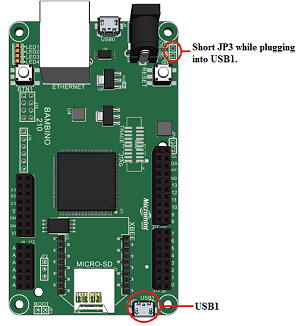
- 3. Program the Interface firmware by deleting the firmware.bin file and copy lpc11u35_vcom.bin to the CRP DISABLED disk.
- 4. Reboot the Interface by disconnecting and reconnecting the USB1 cable without JP3 shorted.
- 5. Finished!


The JTAG connector now free to use with an external JTAG. A virtual COM port is now available to use on USB1.
The LPC4330 signals used for the virtual COM port are listed below:
| LPC4330 PIN NAME | MBED ALIAS |
| P2_10 | USBTX |
| P2_11 | USBRX |