
Bambino-210 Manual/Appendix B
From Manuals
(Difference between revisions)
(→Appendix B - Using an External JTAG with the BAM210) |
(→Appendix B - Using an External JTAG with the BAM210) |
||
| Line 15: | Line 15: | ||
|'''BAM210E''' | |'''BAM210E''' | ||
|'''BAM210''' | |'''BAM210''' | ||
| - | |||
| - | |||
|'''Used for''' | |'''Used for''' | ||
|- | |- | ||
| Line 23: | Line 21: | ||
|MBED-HDK | |MBED-HDK | ||
|MBED-HDK | |MBED-HDK | ||
| - | |||
| - | |||
|MBED-HDK Serial RX | |MBED-HDK Serial RX | ||
|- | |- | ||
| Line 31: | Line 27: | ||
|MBED-HDK | |MBED-HDK | ||
|MBED-HDK | |MBED-HDK | ||
| - | |||
| - | |||
|MBED-HDK Serial TX | |MBED-HDK Serial TX | ||
|- | |- | ||
Revision as of 12:55, 7 October 2014
Appendix B - Using an External JTAG with the BAM210
- 1. Locate the LPC11U35 Virtual COM Port Binary
- 2. Boot the MBED HDK into CRP DISABLED mode by shorting JP3 while connecting the USB Cable to USB1. A
 drive should appear.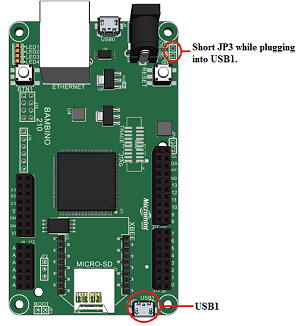
- 3. Program the Interface firmware by deleting the firmware.bin file and copy lpc11u35_vcom.bin to the CRP DISABLED disk.
- 4. Reboot the Interface by disconnecting and reconnecting the USB1 cable without JP3 shorted
- 5. Finished!


The JTAG connector now free to use with an external JTAG. A virtual COM port is now available on USB1. The signals used for the virtual COM port are listed below:
| Signal | LPC4330 PIN NAME | BAM210E | BAM210 | Used for |
| USBTX | P2_10 | MBED-HDK | MBED-HDK | MBED-HDK Serial RX |
| USBRX | P2_11 | MBED-HDK | MBED-HDK | MBED-HDK Serial TX |