
Bambino-210 Manual/Appendix A
From Manuals
(Difference between revisions)
(Created page with '11 ==Appendix A - Updating CMSIS-DAP Firmware== ---- NEXT: Offline Toolchains [[Bambino-210_Manual/In…') |
|||
| (16 intermediate revisions not shown) | |||
| Line 1: | Line 1: | ||
| - | [[Category: Bambino-210_Manual| | + | [[Category: Bambino-210_Manual|A]] |
==Appendix A - Updating CMSIS-DAP Firmware== | ==Appendix A - Updating CMSIS-DAP Firmware== | ||
| - | + | * 1. Locate the updated [[Bambino_Documentation#System Files - mbed|CMSIS-DAP binary file]] | |
| + | * 2. Boot the MBED HDK into CRP DISABLED mode by shorting JP3 while connecting the USB1 Cable. A [[Image:CRP_DISABLED.png]] drive should appear. [[Image:BAM210E_CRP_DISABLED.png|center]] | ||
| + | * 3. Program the Interface firmware by deleting the firmware.bin file and copying the new binary to the CRP DISABLED disk. | ||
| + | * 4. Reboot the Interface by disconnecting and reconnecting the USB1 cable without JP3 shorted | ||
| + | * 5. Verify that the MBED disk comes up | ||
| + | * 6. Finished! | ||
---- | ---- | ||
| - | [[Bambino-210_Manual/ | + | [[Bambino-210_Manual/Appendix B|NEXT: Appendix B - Using an External JTAG with the BAM210]] |
| - | [[Bambino-210_Manual/ | + | [[Bambino-210_Manual/References|PREVIOUS: References]] |
Current revision as of 14:01, 1 June 2015
Appendix A - Updating CMSIS-DAP Firmware
- 1. Locate the updated CMSIS-DAP binary file
- 2. Boot the MBED HDK into CRP DISABLED mode by shorting JP3 while connecting the USB1 Cable. A
 drive should appear.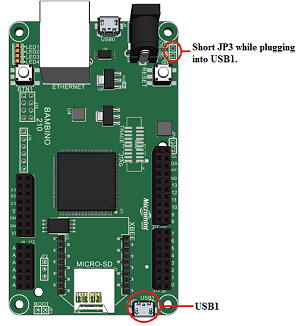
- 3. Program the Interface firmware by deleting the firmware.bin file and copying the new binary to the CRP DISABLED disk.
- 4. Reboot the Interface by disconnecting and reconnecting the USB1 cable without JP3 shorted
- 5. Verify that the MBED disk comes up
- 6. Finished!

